AI drafting, when you want it
AI Property Inspection App: Write It Yourself or Let AI Draft It
Write it yourself
Type or dictate your own condition notes and set the Clean, Undamaged and Working ticks by hand, item by item, the way you always have.
Draft from photos
Tap Generate from Photos and PCRPro drafts the notes, ticks and counts for that area. Review and edit them before anything goes out.
Mix both in the same report, room by room.
Included in every plan · iOS, Android and web
What the AI actually does
There are a few specific jobs where it saves time on site. It doesn’t replace the inspection, and you can write any report entirely by hand.
Generate from Photos
Item counts and missed items
Voice notes to text
Identify an item in a photo
Or write it yourself
Import existing reports
How it works on an ingoing report
Photograph the area
Take photos of the room with the in-app camera, or import them from your library. There’s no need to stop and type as you go.
Tap Generate from Photos
Use all the photos for the area or select a few. PCRPro reads them and drafts a note, ticks and a count for each item. It takes a moment and needs a connection.
Check what it wrote
Drafts go into items you haven’t filled in yet. Anything you’ve already written is never overwritten, and for those items PCRPro offers a suggestion you can apply or dismiss. Items it can’t see clearly are left blank for you.
Edit any draft, undo it, or add your own notes and voice notes. Suggested new items are only added if you accept them.
Send it as your report
Once you’re happy with it, send it to the tenant for review and signature, or export it as PDF or Word. The report is yours, and so is the responsibility for what it says.
AI-assisted vs. typing it up yourself
| Task | Manual reporting | PCRPro with AI |
|---|---|---|
| Writing condition notes | Typed on site or at the office afterwards | Drafted from photos, then edited and confirmed on site |
| Photos | Taken on a phone, sorted and matched to rooms later | Taken inside the area they belong to |
| Notes on the go | Typed on a phone or written on paper | Dictated and transcribed |
| Consistency | Depends on who did the inspection | Drafts use the same wording style across inspectors |
| Missed fixtures | Only caught if the inspector notices | Fixtures seen in photos but not on the list are suggested |
| Old reports | Retyped or attached as a PDF | Imported into a working inspection |
Where a person still has to check
AI drafts from what’s in the photos. These are the places it can’t stand in for the inspector.
Things photos don’t show
Whether an appliance works, a smell, a sticking door, or what’s behind a closed cupboard. Test these and write them up yourself.
Judgement calls
Whether a mark is wear or damage, and how severe it is, needs a person who’s standing in the room.
Counts and descriptions
Counts and descriptions are only as good as the photos. Check them against the property, especially in poor light.
The final version
The report is a record the tenant signs and may be relied on at the end of the tenancy. The inspector confirms it, not the software.
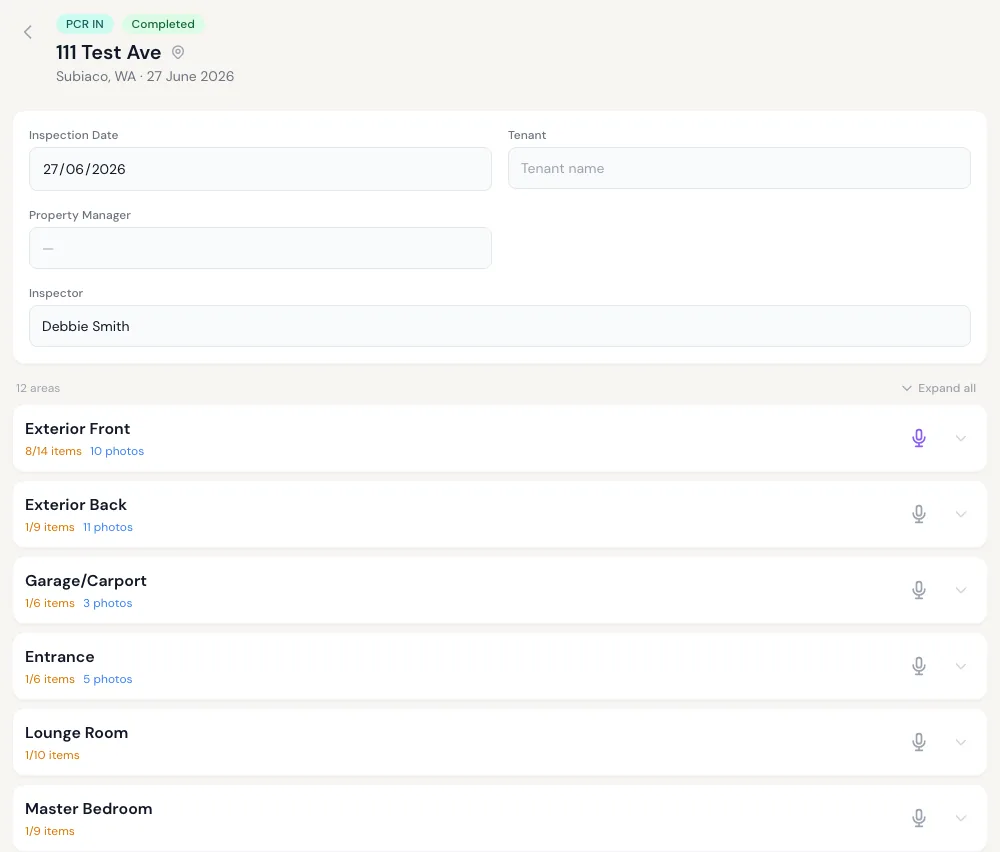
Every area in one view
Item and photo counts show what’s been covered before you leave the property.
AI inspection FAQs
Do I have to use the AI?
No. You can write every condition note yourself, typed or dictated, and set the Clean/Undamaged/Working ticks by hand. Generate from Photos only runs when you tap it, so you can use it for one room, every room or none.
How accurate is the AI?
It’s good at describing what’s clearly visible, such as the surface, colour, general condition and obvious marks. It’s less reliable with poor lighting, small defects, and anything that has to be tested rather than seen. That’s why every draft is shown to the inspector to check and edit, and items it can’t judge are left blank.
We don’t publish an accuracy percentage, because it depends heavily on the photos.
Does the AI finish the report without anyone checking it?
No. It drafts notes inside the inspection for the inspector to review, edit or undo. It doesn’t send reports, sign them or overwrite notes you’ve already written.
What happens to our photos and report data?
Report and account data is hosted in Australia (AWS Sydney). To draft notes or transcribe voice, the relevant photos or audio are sent to third-party AI providers for processing, which may happen outside Australia. Read the Privacy Policy for how personal information is handled, and contact us with any questions.
Can it draft final (outgoing) reports?
The final report starts as a copy of the ingoing one, so the rooms, items and starting notes are already filled in. You record what’s changed. Generate from Photos is currently available on ingoing reports and routine inspections.
Does it work offline?
Inspections, photos and notes work offline and sync later. The AI features need a connection, so take the photos on site and run Generate from Photos when you have signal.
Can we import our old reports?
Yes. Upload a previous condition report as a Word or PDF file and PCRPro extracts it into an inspection. Check the result before relying on it. If you’re moving across from another system, see switching from other inspection apps.
Is the AI an extra cost?
No. The AI features are included in the landlord plan and in agency plans.
Spend less time writing, and keep the final say
AI drafting is included in every plan.